Let’s listen to a demo first:
Mechhaven is the well-known example for demonstrating the OP block in action, which they are used for the wobble bass and the square arp at the end of each phrase.
And here are the modules, including OP Blocks and a FMX Tuner:
OP Blocks
Wave Tuner for FMX
Introduction and Story:
Finally, OP block is available on my blog! OP blocks stands for operators block, and it doesn’t sound OP on its own due to the single oscillator design, but when you chain them, you can instantly get some classic fm sound at the last stage of the OP Block! They are perfect for designing bass and fx part of your tracks. They were used in Vector Computronus and Mech Haven as the bass part of the tracks.
The origin of this module was started in the SunVox discord group. Someone tried to post some 6 operators FM synths, but because FM can have different algorithms (different routing configurations of operators), the user ended up posting 32 individuals modules at once. It is not necessary to have individual modules for each algorithms, and we can implement some routing logic so that the inner connection of operators can be altered on the controller level of the module. As usual, the word “however” shows up, as I have some questions came in mind:
Is it possible to make a FM module which has an ability to let user to define their own algorithms, to make some complex bass design or provide an easy way to explore FM synthesis?
Since I had discovered that delay modules can let metamodules process midi and audio simultaneously, we can now sync up the pitch of each operators by daisy chaining them while leaving an audio input for the incoming carrier signal. With that kind of approach, we can define algorithms at the module level with any number of operators with any form of connection as long as they are not a feedback loop.
Internally, it used to be a complex group of modules, including carrier volume regulation for making the modulation intensity becoming consistent, envelope generator for letting adsr possible in analog generator, and voice kill logic for reducing CPU usage; nevertheless, we no longer need such a complex design anymore since the FMX has been released in SunVox 2.0. Despite a single FMX module, the interface has been retained so that you can still have the same workflow as the former version while being more efficient and stable.
Tutorial and tips for sound design:
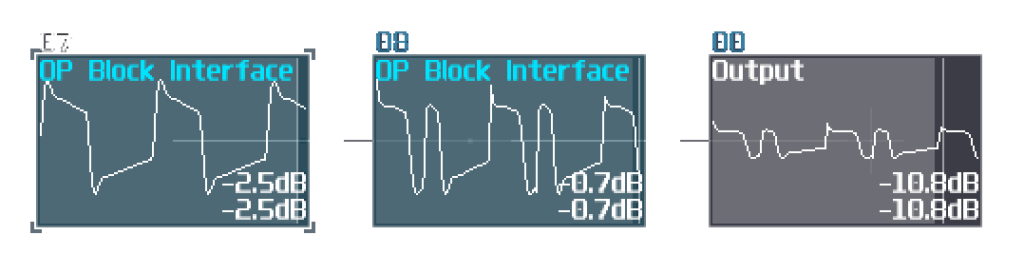
To explore OP blocks, it is recommended play with only two blocks at start, to understand the mechanism behind these modules, so let me show you two OP blocks to form a two block chain:

Can we talk here about the Bitcoin? NO (Someone replied immediately on the warmplace forum)
If you send a midi input for the middle OP block, nothing special happened because it just acts like a normal sunsynth instrument, but if you send midi signal into the left OP block, it will output not only the sine wave, but also a copy of your midi input, so the middle OP block plays with the same pitch while it is being modulated by the incoming sine signal.
Once you know this simple set up, you can may try to change the ASDR and Pitch of the OP block, to hear the modulation result on different pitch of the OP block combo; generally, octave and fifth interval works the best, but nothing prevents you from using other intervals; once you have gotten familiar with the pitch and adsr settings, try to play with different waveform, modulation type and feedback before adding more blocks.
Due to the midi through behaviour, you may directly convert the algorithms into the SunVox representation:
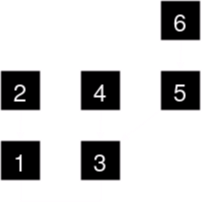
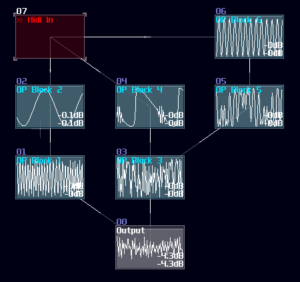
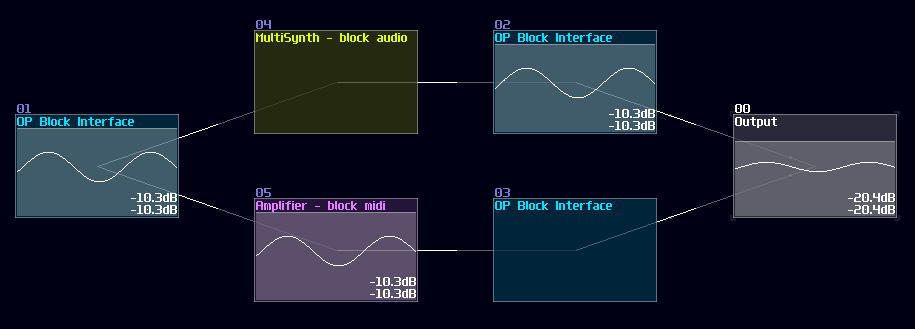
Sometimes, you may not want the midi signal or audio send to the adjacent blocks, so you need to attach an amplifier or a multisynth respectively.
The current version has no wobble function which was quite buggy at the time. To emulate that behaviour, you may use an LFO attached after output of the blocks.
How to load custom waveforms:
In the latest version, you can load your own waveform into OP Block, to do this, you need to use the new controller “Sampling Mode”.

Before touching the controller, you need an input source, which can be any waveform, but it is preferred to be a continuous, consistent waveform which you can use the FMX waveform auto-tuner.
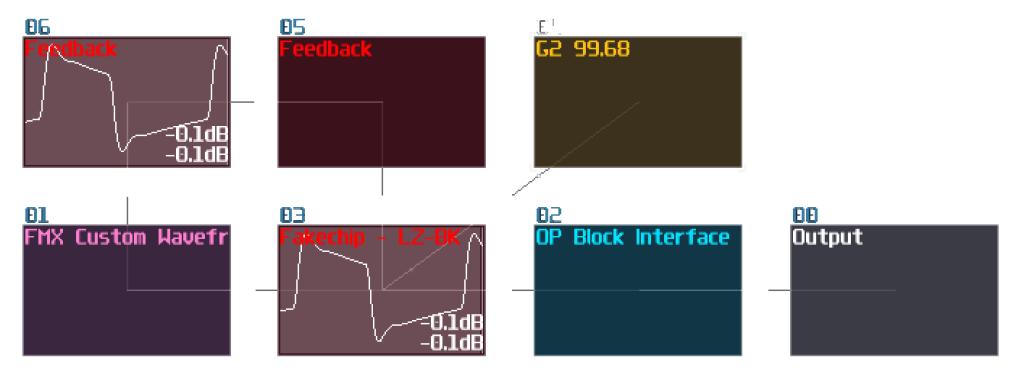
Once you have your input source, you may sample it by set the “Sampling Mode” to ON; at the moment you have toggled the controller, the module immediately record the input source right at the moment. Since this is a one-off event, the length in the ON mode doesn’t matter. Once done, you must set the controller back to OFF state; otherwise, it won’t modulate the input signal like the usual OP block. After you have done all the steps, enjoy your new waveform in OP Blocks!