
This is an 8 note arpeggiator for sending midi arpeggio. Simply connect this module to your favorite sunsynth, and you can generate arpeggios on the fly by pressing a chord. This is the updated version which you can control the velocity of note input individually. Most of the non-stopping track effect still works, so no one can stop you from making arpeggiaception or sliding arpeggios.
There is no controllers, thanks to the 2.1.1 update, the speed of the arpeggiator is sync to your master project. To desync the module, you may set the Auto BPM / TPL to false in the options, so you can define you arpeggiator speed with the default BPM control in the metamodule.
To write notes for the arpeggiator, there are several rules to follow:
The order of the arpeggio is based on the order of the track input, for example:
To make an upward C major arpeggios, you need to insert the note of the chord from lowest to highest:
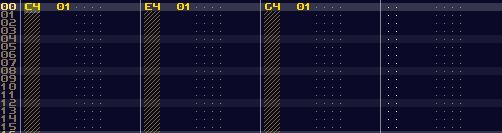
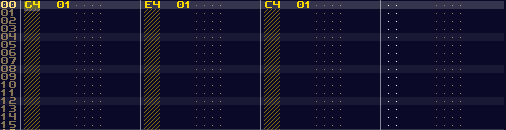
Intuitively, you can get a downward arpeggio if you write the chord from highest note to lowest:
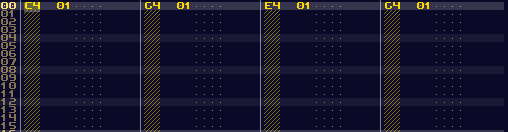
Since you can repeat the same note in a same chord, you can build an Alberti bass by doubling the high note at the second and fourth column:
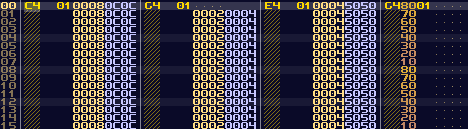
As long as the track effect does not stop a note, you can apply as many track effect as you want. Effects only apply to the to the corresponding note, so you can accent a specific note to make the melody stand out.
The maximum number of sequence is 8 notes, beyond that might gives an undesirable effect to the sequence:

Similar to the previous version, the limitation is that you have to rewrite all the note for every chord change due to the limitation of the stack based design; otherwise, the arpeggiator will play the wrong notes or skipping notes if you write like the left figure.
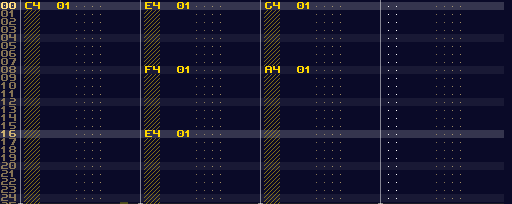
You can’t write like this when there is a chord change
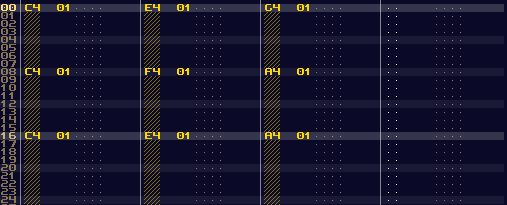
You must refresh every single note for a chord change