
Let’s listen to a quick demo first, which every sound is made of the CaRaCaRa module:
I have prepared the synth and a factory preset which features 23 distinct sounds with an init preset. Simply connect the preset module to the synth and play a note to change the preset.
Download:
Sunsynth Module: CaRaCaRa
Factory Presets: CaRaCaRa Factory Preset
The idea of the module was based on an interesting user oscillator in Korg Monologue XD, Two. Developed by Tim Shoebridge, the oscillator has all the basic waveform, but it has a twist; the synth switches two different waveform for each cycle so that you can produce a complex sound. The phase of each partial can be changed independently using LFO or envelop, so you can make an evolving, lively sound. Here is the video about how the user oscillator works:
I like the idea of the oscillator, so I tried to do something similar; I used an generator, an negative detector and an invertor to separate individual cycle of waveform:
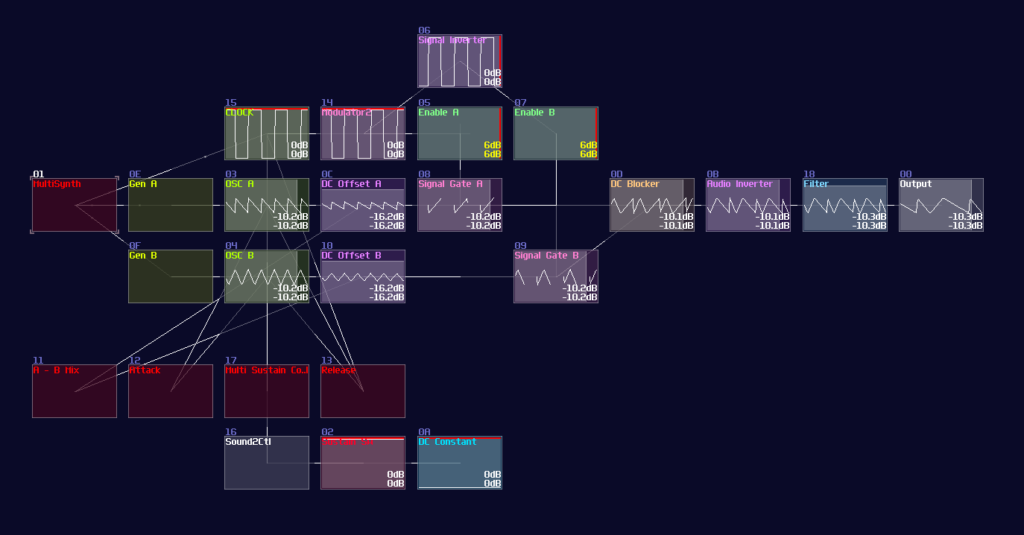
Some of them might notice that was also known as the alternator and it was used for my 2021 Compo entry for pad sound; however, it didn’t include as an official SunVox instrument, and I understand why. I quickly found out that the demo wasn’t that impressive and the module can only created harsh PWN like sound which was boring. In addition, I didn’t use alternator as often due to the same problem, so I decided to upgrade the module to make it more versatile.
Since the 2.0.0 features FMX, this is a powerful module to simplify some of my modules, and they not only run more efficient, but also add an extra stability to reduce the number of weird work around that leads to unexpected behaviors. Besides the use of FMX, I also added a pair of envelopes and LFOs to modulate the phase and self modulation over time, to get a hard-sync like effect.
Now we have a newer version of the alternator and I am satisfied with it, so I decided to give it a new name, CaRaCaRa. Caracara is a bird of prey, which is closely related to falcon, and the name has an alternating pattern which is perfect for showing the behavior of this module.
That’s about it, hope you found it useful for your project. Go ahead to play around the modulation to get something unique.
Controller Details: (coming soon)