
Here are some demos for the filter; the bass and the lead have the same filter setting and you can hear the filters maintain the same harmonic content in different pitch:
Here are two version with different tracking behavior:
– Key Tracking Filter 5.0.0
– Key Tracking Filter 3.3.5
Story and introductions:
Filters are the one of the most important effects for sound design, and sometimes we want the cutoff frequencies aligned to our midi input, so the filter can keep the same harmonic content on different pitches.
Before the era of Logickin, I did an key tracking ADSR, but I got quite a bit of issues from that module, such as missing release stage, boring cutoff change, changing the envelope amount in a non standard way, annoyingly setting up additional modules, ending up not using it at all.
After discovered the delay input trick for metamodules, I decided to build an all in one solutions instead of having three separate modules for the envelope, signal control and filtering, with the latest features in SunVox at the time of release. Thus, the key tracking filter has invented.
Tutorial and tips:
To use the filter, you must send both midi and audio into the module, so you need to connect from an oscillator and a midi input; if you have OP Blocks, you can squarely connect it into the filter.
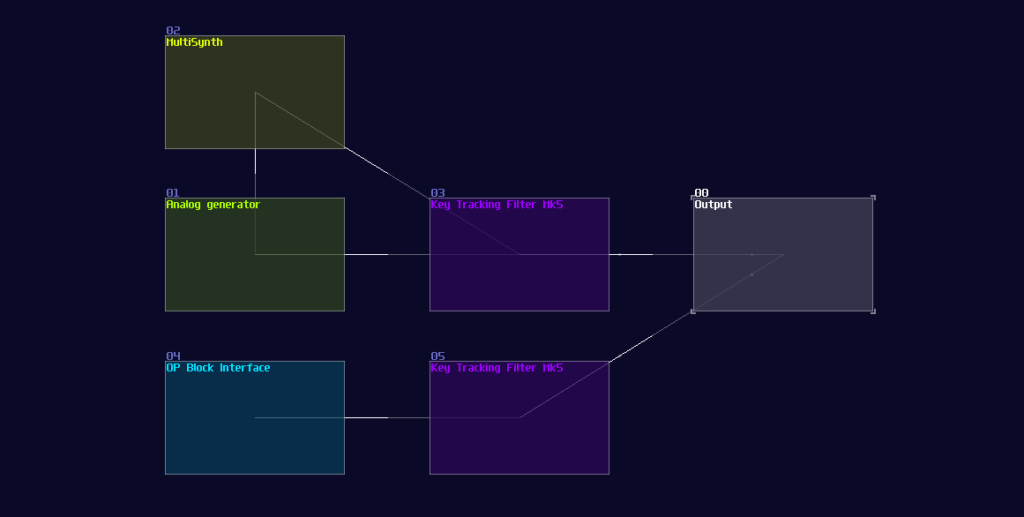
And… that’s it! You should get the initial pluck sound which the sustain of the envelope maintains the same brightness of the incoming sound, while giving off a bit of transient.
Once you have properly connected the module, try to messing around with the EG amount to change the intensity of the envelope, Cutoff to change the overall brightness, and ADSR to change the transient. If you want a tighter sound, you may also consider to change the Curve control to exp2, and vise versa to change them to -exp1 / -exp2. You can change the note on and off behavior as well, so that to provide smoother transition between note changes.
That’s about it. Have fun with the Key Tracking filters!